Encyclopedia · File format
.acv curve (Adobe Curves)
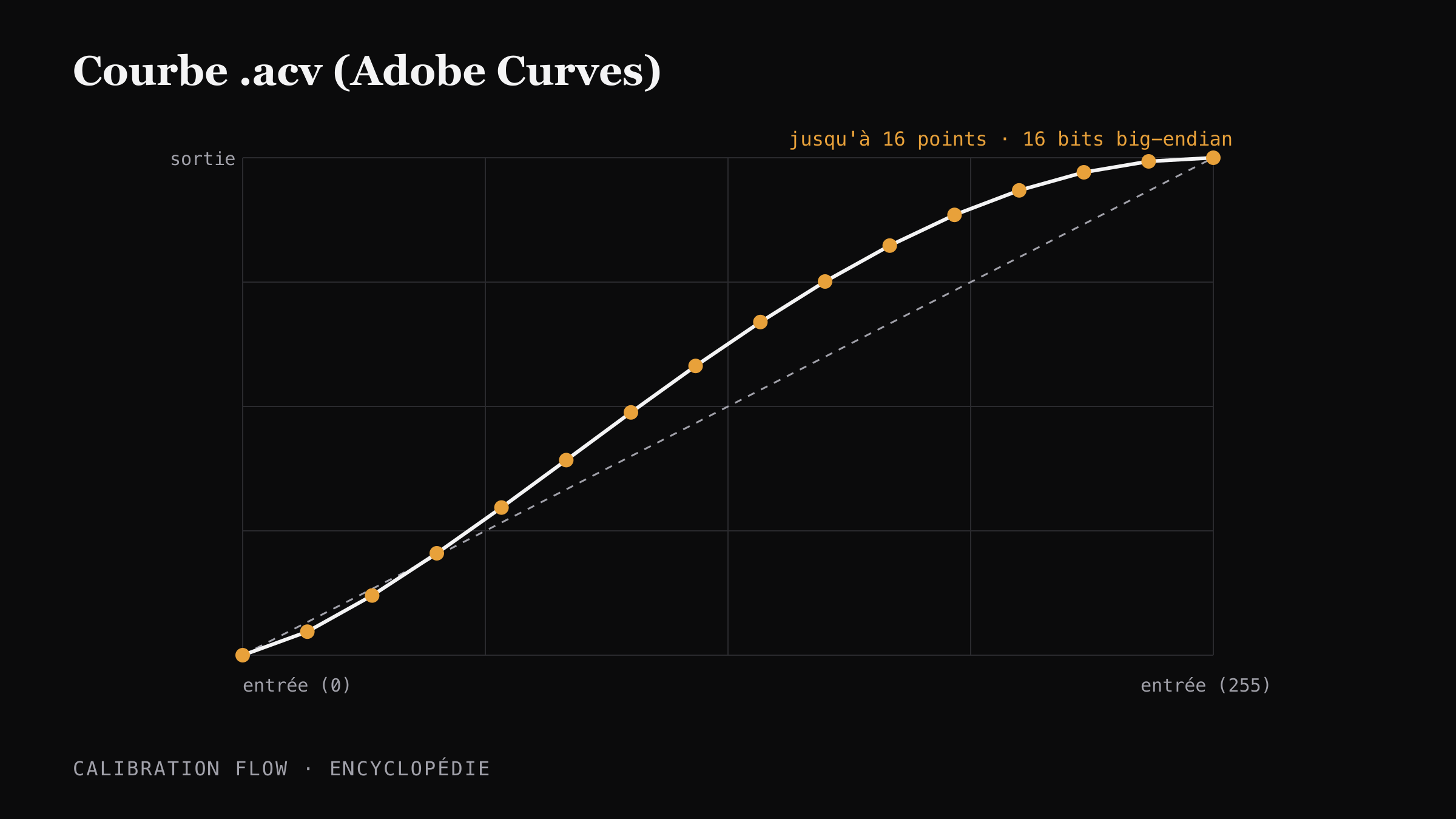
The .acv file (Adobe Curves) is a proprietary Adobe binary format that stores a tonal response curve in version 1, up to 16 points encoded as 16-bit big-endian integers, for under one kilobyte. Photoshop reads it natively since CS6 (2012).
Verified on 2026-05-19 by the Calibration Flow team.
Context and history
Adobe introduced the .acv format with Photoshop to allow saving and sharing of parametric curves in the Curves dialog (Image → Adjustments → Curves). The format has stayed at version 1 since its origins: Photoshop CS6 (2012) and every later version, up to Photoshop 2026, read it without conversion.
In alternative photography, the .acv became a pivot format: the calibration tools for UV processes (cyanotype, platinum/palladium, gum bichromate, carbon, Van Dyke) export a correction curve as .acv that the practitioner loads in Photoshop to prepare their digital negative before printing on transparency. Mark Nelson (PDN — Precision Digital Negatives) popularised this use back in the 2000s.
Beware a frequent confusion: "Adobe Curves Vector" does not exist. The .acv format is raster-friendly but not vector; it describes an interpolation curve, not a Bézier path in the SVG sense.
How the .acv format works
An .acv file is a binary blob structured in big-endian:
- Header:
[version u16 = 1][curveCount u16 = 1][pointCount u16]. - Points: a series of
[output u16, input u16]pairs — the output comes before the input in the binary, which often surprises implementers. - Value range: 0 to 255 (8 perceptual bits) written into 16-bit slots.
- Maximum points: 16. Beyond that, Photoshop ignores the excess points and some export tools automatically reduce them to 16 by resampling.
The format is poorly suited to very detailed curves (the 256 values of a LUT do not fit) but excels at storing a control spline that Photoshop re-interpolates on opening. For alt-process calibration, 16 points are plenty: the tonal response of a chemical process is continuous and relatively smooth.
Adjust the curve live
Calibration Flow corrects any non-linear response with three sliders. No point to draw with the mouse, no Bézier handle to wrangle. Play with the values below and see the effect on the curve and on the your process tonal rendering immediately.
Input 0–255 ↔ Output 0–255
Minimum input threshold. Everything below it becomes pure black.
Maximum input threshold. Everything above it becomes pure white.
Midtone curvature. 1.00 = linear, < 1 = darker mid-tones, > 1 = lighter mid-tones.
Source gradient (before correction)
Corrected gradient (after applying the curve)
This demo applies a simple formula (black/white points + gamma exponent) for illustration. The app additionally uses a robust LOWESS + monotone PCHIP smoothing pass that rounds off transitions without creating artefacts. The Mode Pro (€9.90/month) then lets you export a .acv file, loadable into Photoshop or Affinity Photo in two clicks.
The .acv in Calibration Flow
Calibration Flow internally computes a 256-value corrected LUT (look-up table) by linear interpolation between the 25 points measured on the test chart, smoothed with robust LOWESS and monotonic PCHIP. On export, the tool resamples this LUT to the 16-point maximum allowed by the .acv format, then writes the 16-bit big-endian binary via the File System Access API (with a <a download> fallback).
The final file typically weighs under one kilobyte. It is named after the preset and date to ease versioning. Once loaded in Photoshop’s Curves panel, it is best applied on a non-destructive adjustment layer, which lets you compare several curves without redoing the whole chain.
.acv vs other curve formats
Numerical landmarks to place .acv among the formats used in tonal calibration.
| Format | Max points | Depth | Typical size | Photoshop read |
|---|---|---|---|---|
| .acv | 16 | 16-bit | < 1 KB | Native (CS6+) |
| .amp (Photoshop) | 256 | 8-bit | ~1 KB | Native (legacy) |
| .cube (3D LUT) | 17³ — 65³ | float ASCII | 100 KB — 5 MB | Via Color Lookup |
| QTR .quad | 256 | 16-bit ASCII | ~10 KB | No (QuadToneRIP only) |
Sources and references
- Adobe — official Photoshop documentation, Curves panel: helpx.adobe.com/photoshop/using/curves-adjustment.
- AlternativePhotography.com — guide on using Photoshop curves in alternative printing: alternativephotography.com.
- Wikipedia — Adobe Photoshop file formats: en.wikipedia.org/wiki/Adobe_Photoshop.
- Mark Nelson, Precision Digital Negatives (PDN) — historical reference on the use of .acv in alternative photography.
Go further
- Export an .acv curve and import it into Photoshop — step-by-step in the manual.
- Calibration Flow + Photoshop workflow — full setup, non-destructive adjustment layers.
- See this format in practice on the Cyanotype page — a concrete .acv export example for a UV process.
- Glossary of technical terms.