Encyclopedia · Measurement instrument
Calibration target
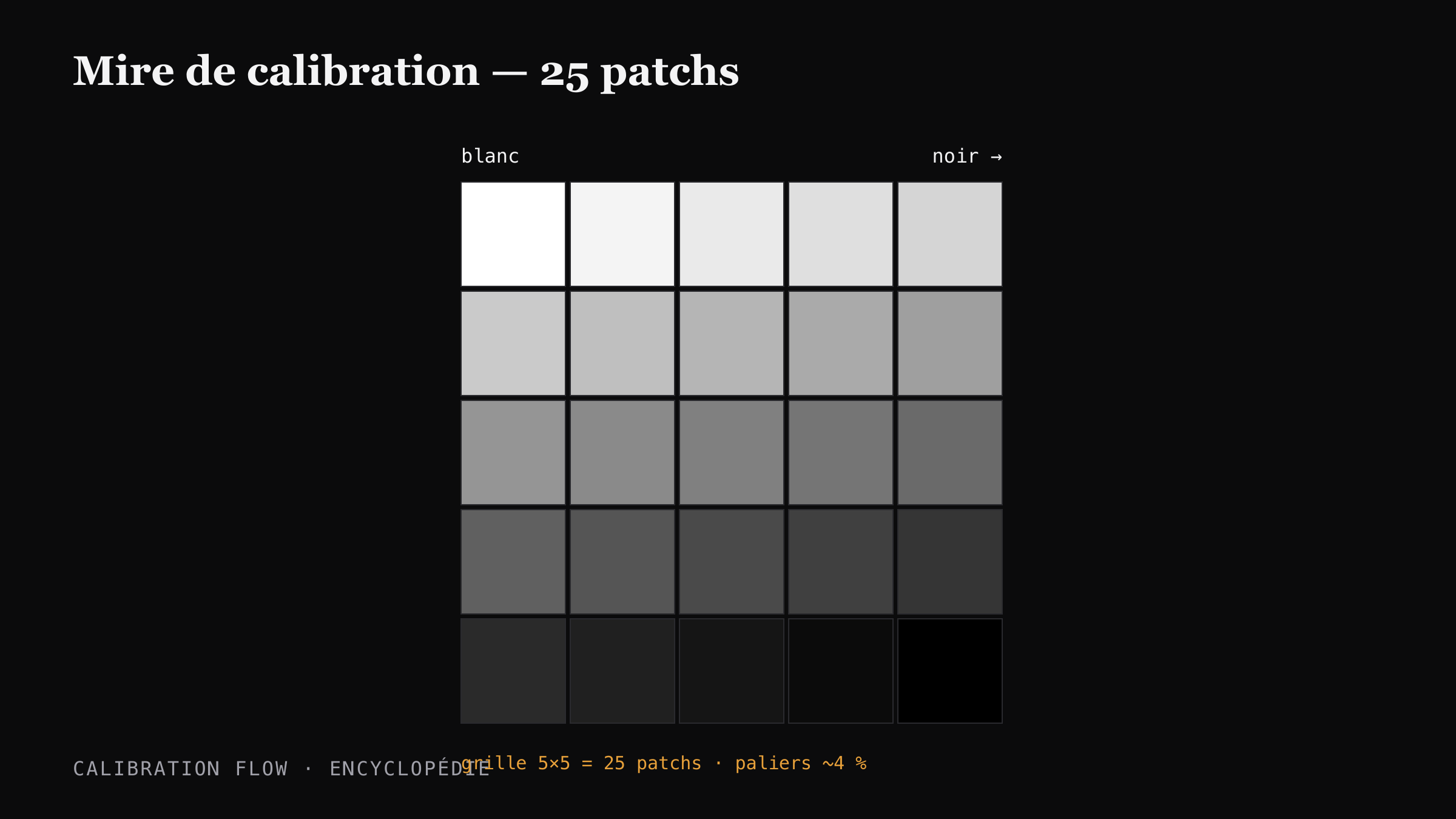
A calibration target is a grid of grey patches ordered from white to black, used to measure the tonal response of a photographic process. Calibration Flow generates a target of 25 patches in a 5×5 grid, with intensity steps of about 4%.
Verified on 2026-05-19 by the Calibration Flow team.
Context and history
The target — step wedge or step tablet — was born with the sensitometry of Hurter and Driffield (1890), who needed a physical standard to plot a characteristic curve. In the 20th century, two industrial references emerged: the Stouffer Industries Step Wedge (Stouffer Industries, founded 1948, USA) and the Kodak Q-13 Gray Scale (1950s).
The Stouffer T2115 — a 21-step silver film, density 0.05 to 3.05 in 0.15 increments — has remained the reference standard in alternative photography since the 1980s. Mark Nelson cites it as a required support in his Precision Digital Negatives. The Kodak Q-13 (20 steps on card, white to 1.95 D) was mainly used for studio lighting control.
These "physical" targets have two limits for digital calibration: they cost €50 to €150 each and their reference density does not necessarily match the target printed by the user on their own printer. Hence the appearance of software targetsprinted by the user, with parameters adapted to their print chain.
How a calibration target works
Three properties make a grid of grey patches usable for calibration:
- Regular ordering — the patches must follow a known progression (linear, gamma, or logarithmic steps). Without regularity, it is impossible to plot an input/output deviation curve.
- Distinct patches — each patch must be visually separable from the next. Below 3% difference, the human eye can no longer tell them apart on most processes.
- Stable measurement — the patches must be large and uniform enough that a measurement (densitometer, camera sensor) returns a reproducible value. Calibration Flow uses an internal patch radius (60% of the visible radius, average or center mode).
The number of patches is a trade-off. Too few (10 to 15): the correction curve lacks precision in critical transitions (cyanotype highlights, carbon shadows). Too many (50+): measurement becomes slow, patches are small, individual variance rises.
25 patches on a 5×5 grid offers a good compromise: steps of ~4.17% (1/24) fine enough to follow tonal transitions, and a comfortable patch size on A4 or A3+ for a stable camera-sensor measurement.
Generate your encyclopedic target now
25-patch target (5×5 grid + continuous gradient), equal steps of about 4.2 % in grey value, from white to black. Pick your polarity below, download, print on inkjet transparency with colour management off, expose onto your sensitised paper.
Downloaded file at 1680×1410 px (300 dpi), free, no sign-up. In the app, a 25-step grey grid and its gradient print straight onto a corner of your negative (Target → Show the target tab) and get the same curve as the image.
Target computed like the app’s: evenly spaced grey steps and a continuous gradient. On a scan, the app reads each step as perceptual lightness, L* (CIELAB).
The target in Calibration Flow
Calibration Flow prints a target of 25 patches arranged in a 5×5 gridstraight onto your negative (Target tab → “Show the target”, bottom-left corner), with intensity computed by intensity = i / 24(where i runs from 0 to 24). This gives 25 visually distinct steps between pure white (i=0) and pure black (i=24), spaced about 4.17% apart.
The render always includes a continuous gradient strip to the right of the grid, a visual reference to read tonal ratios at a glance. Two polarities are available: positive (white top-left, black bottom-right) and negative (the inverse, for hardening processes where you expose a negative).
The printed target is then scanned or photographed, and the app measures the L* luminance of each patch via a finger-positionable patch overlay. The target goes through the same curve as the image: with a curve applied, it becomes a check that the curve holds on the print.
Calibration Flow vs historical targets
Landmarks to place the Calibration Flow 25-patch target among industry standards.
| Target | Patches | Step | Medium | Price |
|---|---|---|---|---|
| Calibration Flow | 25 (5×5) | ~4.17% | PNG runtime, user-printed | Included |
| Stouffer T2115 | 21 | 0.15 D log | Factory-calibrated silver film | ~80 € |
| Stouffer T4110 | 41 | 0.10 D log | Factory-calibrated silver film | ~120 € |
| Kodak Q-13 | 20 | 0.10 D log | Reflection card | ~€30 (historical) |
| Home-printed 21-step target | 21 | ~5 % | Printable PNG or PDF | Free |
Sources and references
- Stouffer Industries — step wedge catalogue T2115 and T4110: stouffer.net.
- Kodak (historical) — Q-13 Gray Scale, datasheet archived by AlternativePhotography: alternativephotography.com.
- Wikipedia — Step wedge: en.wikipedia.org/wiki/Step_wedge.
- Mark Nelson, Precision Digital Negatives (PDN) — use of the Stouffer T2115 as a reference in Photoshop-curve calibration.
Go further
- Target types in the manual — positive, negative, A4 dithering variants.
- Positive vs negative target — when to use which.
- Print a target without colour management — printing protocol.
- See the target in practice on the Cyanotype page.
- Glossary — Target entry.